基本VLAN交换
许多MikroTik设备都有内置的交换芯片,通常有一个选项可以在硬件层面上进行VLAN交换,这意味着如果使用适当的配置方法,就可以利用VLAN实现线速性能。不同型号的设备的配置方法会有变化,本指南将重点介绍如何使用不同的设备,通过正确的配置,从主干端口设置一个基本的主干/接入端口,以达到最佳性能,并充分利用可用的硬件组件。
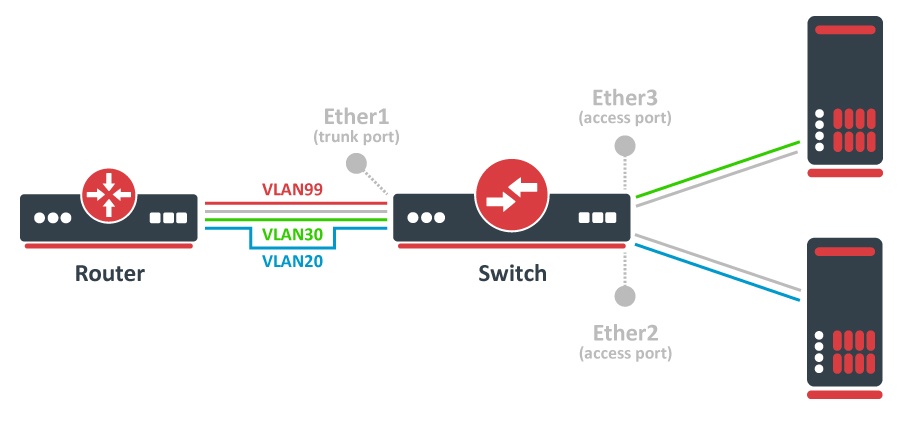
CRS3xx、CRS5xx系列交换机,CCR2116、CCR2216和RTL8367、88E6393X、88E6191X和MT7621交换芯片
/interface bridge
add name=bridge1 frame-types=admit-only-vlan-tagged
/interface bridge port
add bridge=bridge1 interface=ether1 frame-types=admit-only-vlan-tagged
add bridge=bridge1 interface=ether2 pvid=20 frame-types=admit-only-untagged-and-priority-tagged
add bridge=bridge1 interface=ether3 pvid=30 frame-types=admit-only-untagged-and-priority-tagged
/interface bridge vlan
add bridge=bridge1 tagged=ether1 vlan-ids=20
add bridge=bridge1 tagged=ether1 vlan-ids=30
add bridge=bridge1 tagged=ether1,bridge1 vlan-ids=99
/interface vlan
add interface=bridge1 vlan-id=99 name=MGMT
/ip address
add address=192.168.99.1/24 interface=MGMT
/interface bridge
set bridge1 vlan-filtering=yes
更详细的例子可以在 这里 找到。
RTL8367、88E6393X、88E6191X和MT7621交换芯片从RouterOS v7开始可以使用HW卸载的vlan过滤特性。
将 "frame-types "设置为 "admit-all "或 "admit-only-untagged-and-priority-tagged "的网桥端口将被自动添加为 "pvid "VLAN的untagged端口。
CRS1xx/CRS2xx系列交换机
/interface bridge
add name=bridge1
/interface bridge port
add bridge=bridge1 interface=ether1
add bridge=bridge1 interface=ether2
add bridge=bridge1 interface=ether3
/interface ethernet switch ingress-vlan-translation
add ports=ether2 customer-vid=0 new-customer-vid=20
add ports=ether3 customer-vid=0 new-customer-vid=30
/interface ethernet switch egress-vlan-tag
add tagged-ports=ether1 vlan-id=20
add tagged-ports=ether1 vlan-id=30
add tagged-ports=ether1,switch1-cpu vlan-id=99
/interface ethernet switch vlan
add ports=ether1,ether2 vlan-id=20
add ports=ether1,ether3 vlan-id=30
add ports=ether1,switch1-cpu vlan-id=99
/interface vlan
add interface=bridge1 vlan-id=99 name=MGMT
/ip address
add address=192.168.99.1/24 interface=MGMT
/interface ethernet switch
set drop-if-invalid-or-src-port-not-member-of-vlan-on-ports=ether1,ether2,ether3
更详细的例子可以在 这里 找到。
其他具有内置交换芯片的设备
/interface bridge
add name=bridge1
/interface bridge port
add bridge=bridge1 interface=ether1
add bridge=bridge1 interface=ether2
add bridge=bridge1 interface=ether3
/interface ethernet switch vlan
add ports=ether1,ether2 switch=switch1 vlan-id=20
add ports=ether1,ether3 switch=switch1 vlan-id=30
add ports=ether1,switch1-cpu switch=switch1 vlan-id=99
/interface vlan
add interface=bridge1 vlan-id=99 name=MGMT
/ip address
add address=192.168.99.1/24 interface=MGMT
/interface ethernet switch port
set ether1 vlan-mode=secure vlan-header=add-if-missing
set ether2 vlan-mode=secure vlan-header=always-strip default-vlan-id=20
set ether3 vlan-mode=secure vlan-header=always-strip default-vlan-id=30
set switch1-cpu vlan-header=leave-as-is vlan-mode=secure
更详细的例子可以在 这里 找到。
并非所有带有交换芯片的设备都能在硬件层面进行VLAN交换,请检查每个交换芯片支持的功能,兼容性表可以在 这里 找到 。如果一个设备支持 "VLAN表 ",那么它就能够使用内置的交换芯片进行VLAN交换。你可以通过所提供的链接或使用 /interface ethernet switch print 来查看设备的交换芯片。
在 QCA8337 和**Atheros8327** 交换芯片上,应使用默认的 vlan-header=leave-as-is 属性。交换芯片将通过 default-vlan-id 属性来确定哪些端口是接入端口。default-vlan-id 只应在接入/混合端口上使用,以指定未标记的入站流量被分配到哪个VLAN。
这种类型的配置应在RouterBOARD系列设备上使用,这包括RB4xx, RB9xx, RB2011, RB3011, hAP, hEX, cAP和其他设备。
默认情况下,网桥接口的配置是将协议模式设置为 rstp。对于某些设备, 这可能会禁用硬件卸载, 因为有些交换芯片不支持这一功能。请参阅 Bridge Hardware Offloading 部分查看支持的功能。
对于有多个交换芯片的设备(例如,RB2011、RB3011、RB1100),每个交换芯片只能在同一交换芯片的端口之间交换VLAN流量,VLAN过滤在不同交换芯片的端口之间不会在硬件层面上发挥作用,这意味着如果你打算使用交换芯片的VLAN过滤,就不应该把所有的端口添加到一个网桥上,交换芯片之间的VLAN将不会得到过滤。你可以在两个交换芯片之间连接电缆来绕过这个硬件限制,另一个选择是使用网桥VLAN过滤,但它禁用了硬件卸载(降低了总吞吐量)。
其他没有内置交换芯片的设备
可以用CPU做VLAN过滤,有多种方法,但强烈建议使用桥接VLAN过滤。
/interface bridge
add name=bridge1 frame-types=admit-only-vlan-tagged
/interface bridge port
add bridge=bridge1 interface=ether1 frame-types=admit-only-vlan-tagged
add bridge=bridge1 interface=ether2 pvid=20 frame-types=admit-only-untagged-and-priority-tagged
add bridge=bridge1 interface=ether3 pvid=30 frame-types=admit-only-untagged-and-priority-tagged
/interface bridge vlan
add bridge=bridge1 tagged=ether1 vlan-ids=20
add bridge=bridge1 tagged=ether1 vlan-ids=30
add bridge=bridge1 tagged=ether1,bridge1 vlan-ids=99
/interface vlan
add interface=bridge1 vlan-id=99 name=MGMT
/ip address
add address=192.168.99.1/24 interface=MGMT
/interface bridge
set bridge1 vlan-filtering=yes
更详细的例子可以在 这里 找到。