介绍
Routerboards上有几种交换芯片,它们有不同的功能。大多数只有基本的 "端口交换"功能,但也有少数有更多的功能。
| Feature | QCA8337 | Atheros8327 | Atheros8316 | Atheros8227 | Atheros7240 | IPQ-PPE | ICPlus175D | MT7621 | RTL8367 | 88E6393X | 88E6191X | 98PX1012 | Other |
|---|---|---|---|---|---|---|---|---|---|---|---|---|---|
| Port Switching | yes | yes | yes | yes | yes | yes | yes | yes | yes | yes | yes | no | yes |
| Port Mirroring | yes | yes | yes | yes | yes | no | yes | yes | yes | yes | yes | no | no |
| TX limit 1 | yes | yes | yes | yes | yes | no | no | yes | yes | yes | yes | no | no |
| RX limit 1 | yes | yes | no | no | no | no | no | yes | yes | yes | yes | no | no |
| Host table | 2048 entries | 2048 entries | 2048 entries | 1024 entries | 2048 entries | 2048 entries | 2048项 2 | 2048 entries | 2048 entries | 16k entries | 16k entries | no | no |
| Vlan table | 4096 entries | 4096 entries | 4096 entries | 4096 entries | 16 entries | no | no | 4096 entries 3 | 4096 entries 3 | 4096 entries 3 | 4096 entries 3 | no | no |
| Rule table | 92 rules | 92 rules | 32 rules | no | no | no | no | no | no | 256 | no | no | no |
说明
对于QCA8337, Atheros8327, Atheros8316, Atheros8227和Atheros7240,Tx/Rx速率限制可以通过
/interface ethernet菜单上的bandwidth属性来改变,更多细节见 Ethernet manual。对于RTL8367、88E6393X、88E6191X和MT7621,可以通过/interface ethernet switch port菜单上的egress-rate和ingress-rate属性来改变Tx/Rx速率限制。MAC地址可以学习到指定的数量,但是RouterOS中没有交换机主机表的内容,不支持静态主机配置。
Bridge HW vlan-filtering 是在RouterOS 7.1rc1(RTL8367)和7.1rc5(MT7621)版本中添加的。交换机不支持其他 "ether-type "0x88a8或0x9100(只支持0x8100),也不支持 "tag-stacking"。使用这些功能将禁用HW卸载。
Cloud Router Switch(CRS)系列设备集成了先进的交换芯片,它们支持多种功能。关于CRS1xx/CRS2xx系列设备的交换芯片功能,请查看 CRS1xx/CRS2xx系列交换机 手册,对于CRS3xx系列设备,请查看 CRS3xx、CRS5xx系列交换机和CCR2116、CCR2216路由器 手册。
| RouterBoard | 交换芯片说明 |
|---|---|
| C52iG-5HaxD2HaxD-TC (hAP ax2), C53UiG+5HPaxD2HPaxD (hAP ax3), Chateau ax series | IPQ-PPE (ether1-ether5) |
| RB5009 series | 88E6393X (ether1-ether8, sfp-sfpplus1) |
| CCR2004-16G-2S+ | 88E6191X (ether1-ether8); 88E6191X (ether9-ether16); |
| RB4011iGS+ | RTL8367 (ether1-ether5); RTL8367 (ether6-ether10); |
| RB1100AHx4 | RTL8367 (ether1-ether5); RTL8367 (ether6-ether10); RTL8367 (ether11-ether13) |
| RB750Gr3 (hEX), RB760iGS (hEX S) | MT7621 (ether1-ether5) |
| RBM33G | MT7621 (ether1-ether3) |
| RB3011 series | QCA8337 (ether1-ether5); QCA8337 (ether6-ether10) |
| RB OmniTik ac series | QCA8337 (ether1-ether5) |
| RBwsAP-5Hac2nD (wsAP ac lite) | Atheros8227 (ether1-ether3) |
| RB941-2nD (hAP lite) | Atheros8227 (ether1-ether4) |
| RB951Ui-2nD (hAP); RB952Ui-5ac2nD (hAP ac lite); RB750r2 (hEX lite); RB750UPr2 (hEX PoE lite); RB750P-PBr2 (PowerBox); RB750P r2; RBOmniTikU-5HnDr2 (OmniTIK 5); RBOmniTikUPA-5HnDr2 (OmniTIK 5 PoE) | Atheros8227 (ether1-ether5) |
| RB750Gr2 (hEX); RB962UiGS-5HacT2HnT (hAP ac); RB960PGS (hEX PoE); RB960PGS-PB (PowerBox Pro) | QCA8337 (ether1-ether5) |
| RB953GS | Atheros8327 (ether1-ether3+sfp1) |
| RB850Gx2 | Atheros8327 (ether1-ether5) with ether1 optional |
| RB2011 series | Atheros8327 (ether1-ether5+sfp1); Atheros8227 (ether6-ether10) |
| RB750GL; RB751G-2HnD; RB951G-2HnD; RBD52G-5HacD2HnD (hAP ac²), RBD53iG-5HacD2HnD (hAP ac³), RBD53GR-5HacD2HnD&R11e-LTE6 (hAP ac³ LTE6 kit), RBD53G-5HacD2HnD-TC&EG12-EA (Chateau LTE12) | Atheros8327 (ether1-ether5) |
| RBcAPGi-5acD2nD (cAP ac), RBwAPGR-5HacD2HnD (wAP R ac and wAP ac LTE series), RBwAPG-5HacD2HnD (wAP ac), RBD25G-5HPacQD2HPnD (Audience), RBD25GR-5HPacQD2HPnD&R11e-LTE6 (Audience LTE6 kit), | Atheros8327 (ether1-ether2) |
| RBD22UGS-5HPacD2HnD (mANTBox 52 15s) | Atheros8327 (ether1-sfp1) |
| RB1100AH | Atheros8327 (ether1-ether5); Atheros8327 (ether6-ether10) |
| RB1100AHx2 | Atheros8327 (ether1-ether5); Atheros8327 (ether6-ether10) |
| CCR1009-8G-1S-1S+; CCR1009-8G-1S | Atheros8327 (ether1-ether4) |
| RB493G | Atheros8316 (ether1+ether6-ether9); Atheros8316 (ether2-ether5) |
| RB435G | Atheros8316 (ether1-ether3) with ether1 optional |
| RB450G | Atheros8316 (ether1-ether5) with ether1 optional |
| RB450Gx4 | Atheros8327 (ether1-ether5) |
| RB433GL | Atheros8327 (ether1-ether3) |
| RB750G | Atheros8316 (ether1-ether5) |
| RB1200 | Atheros8316 (ether1-ether5) |
| RB1100 | Atheros8316 (ether1-ether5); Atheros8316 (ether6-ether10) |
| DISC Lite5 | Atheros8227 (ether1) |
| RBmAP2nD | Atheros8227 (ether1-ether2) |
| RBmAP2n | Atheros7240 (ether1-ether2) |
| RB750 | Atheros7240 (ether2-ether5) |
| RB750UP | Atheros7240 (ether2-ether5) |
| RB751U-2HnD | Atheros7240 (ether2-ether5) |
| RB951-2n | Atheros7240 (ether2-ether5) |
| RB951Ui-2HnD | Atheros8227 (ether1-ether5) |
| RB433 series | ICPlus175D (ether2-ether3); older models had ICPlus175C |
| RB450 | ICPlus175D (ether2-ether5); older models had ICPlus175C |
| RB493 series | ICPlus178C (ether2-ether9) |
| RB816 | ICPlus178C (ether1-ether16) |
命令行配置在交换机菜单下。这个菜单包含了系统中存在的所有交换芯片的列表和一些Submenu。
[admin@MikroTik] > /interface ethernet switch print
Flags: I - invalid
 #   NAME         TYPE             MIRROR-SOURCE       MIRROR-TARGET       SWITCH-ALL-PORTS
 0   switch1      Atheros-8327     none                none
 1   switch2      Atheros-8227     none                none
根据交换机的类型,有些配置功能可能没有。
特性
端口交换
为了在非CRS系列设备上设置端口交换,请查看 网桥硬件卸载 。
在RouterOS v6.41和更新的版本中,端口交换是通过网桥配置完成的。在RouterOS v6.41之前,端口交换是使用主端口属性完成的。
交换所有端口功能
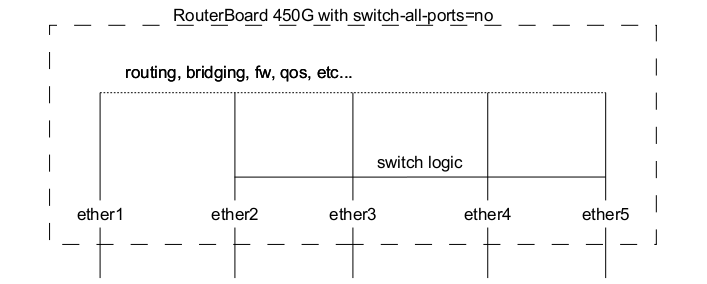
在RB450G/RB435G/RB850Gx2设备上的Ether1端口有一个功能,允许它被移除/添加到默认的交换机组中,这个设置在 /interface ethernet switch 菜单中。默认情况下,ether1端口将包括在交换机组中。
| 属性 | 说明 |
|---|---|
| switch-all-ports (no _ | yes_; Default: yes) | 仅在RB450G/RB435G/RB850Gx2设备上改变ether1交换机组。 - yes - ether1是交换机的一部分,支持交换机分组和所有其他高级Atheros8316/Atheros8327功能,包括扩展统计(/interface ethernet print stats)。- no - ether1不是交换机的一部分,让它成为一个独立的以太网端口,这样增加了它在桥接和路由模式下对其他端口的吞吐量,但取消了这个端口上的交换特性。 |
端口镜像
端口镜像使交换机可以复制所有进出一个端口("镜像源")的流量,并将这些复制的帧发送到其他端口("镜像目标")。这个功能可以用来轻松建立一个 "阀门"设备,接收所有进出某个特定端口的流量。注意,"镜像源"和 "镜像目标"端口必须属于同一个交换机(见"/interface ethernet "菜单中哪个端口属于哪个交换机)。另外,镜像目标可以有一个特殊的 "cpu"值,这意味着镜像的数据包被发送到交换机芯片的CPU端口。端口镜像独立于已经配置或尚未配置的交换组。
Sub-menu: /interface ethernet switch
| 属性 | 说明 |
|---|---|
| mirror-source (name | none; Default: none) | 选择一个单一的镜像源端口。入站和出站流量发送到mirror-target端口。注意,mirror-target端口必须属于同一个交换机(参见"/interface ethernet "菜单中哪个端口属于哪个交换机)。 |
| mirror-target (name | none | cpu; Default: none) | 选择一个单一的镜像目标端口。来自mirror-source和mirror(见规则和主机表中的属性)的镜像数据包将发送到选定的端口。 |
| mirror-egress-target (name | none; Default: none) | 选择一个单一的镜像出口目标端口,只适用于88E6393X和88E6191X交换芯片。来自 "mirror-egress"(见端口菜单中的属性)的镜像数据包发送至所选端口。 |
Sub-menu: /interface ethernet switch rule
| 属性 | 说明 |
|---|---|
| mirror (no | yes; Default: no) | 是否向mirror-target端口发送数据包副本。 |
| mirror-ports (name; Default: ) | 选择多个镜像目标端口,仅适用于88E6393X交换芯片。ACL规则中的匹配数据包将复制并发送至选定的端口。 |
Sub-menu: /interface ethernet switch host
| 属性 | 说明 |
|---|---|
| mirror (no | yes; Default: no) | 是否从有匹配MAC目标地址的帧(CRS3xx系列交换机的匹配目标或源地址)向mirror-target端口发送帧副本 |
Sub-menu: /interface ethernet switch port
| 属性 | 说明 |
|---|---|
| mirror-egress (no | yes; Default: no) | 是否向 "mirror-egress-target "端口发送出站数据包拷贝,仅适用于88E6393X和88E6191X交换机芯片。 |
| mirror-ingress (no | yes; Default: no) | 是否向 "mirror-ingress-target "端口发送入站数据包拷贝,仅在88E6393X和88E6191X交换机芯片上可用。 |
| mirror-ingress-target (name | none; Default: none) | 选择一个单一的镜像入站目标端口,只适用于88E6393X和88E6191X交换机芯片。来自 "mirror-ingress "的镜像数据包将被发送到选定的端口。 |
端口镜像配置示例:
/interface ethernet switch
set switch1 mirror-source=ether2 mirror-target=ether3
如果把镜像源设置为至少有两个交换芯片设备的以太网端口,并且这些镜像源端口在一个网桥中,而两个交换芯片的镜像目标被设置为将数据包发送到CPU将导致环路,可能使设备无法访问。
端口设置
本菜单下的属性用于为支持VLAN表的交换芯片配置VLAN交换和过滤选项。这些属性只适用于支持VLAN表的交换芯片,请查看 交换芯片特性 确定你的设备支持该功能。
入站流量被认为是被送 入 某个端口的流量,这个端口有时被称为 入站端口 。出口流量是指从某一端口 发送 的流量,这个端口有时被称为 出站 端口。区分它们对于正确设置VLAN过滤是非常重要的,因为有些属性只适用于入站或出站流量。
| 属性 | 说明 |
|---|---|
| vlan-mode (check | disabled | fallback | secure; Default: disabled) | 根据 VLAN表 改变VLAN查询机制,以获取入站流量。 - disabled- 完全禁止对进入的流量进行VLAN表的检查。当设置在入站端口时,流量不会被丢弃。- fallback- 根据VLAN表检查入站流量的标记,并转发所有未标记的流量。如果入站流量是标记的,而出站端口在VLAN表中没有找到相应的VLAN ID,那么流量会被丢弃。如果在VLAN表中没有找到VLAN ID,那么流量会被转发。用于仅在特定端口允许已知的VLAN。- check- 根据VLAN表检查入站流量的标签流量,并丢弃所有无标签的流量。如果入站流量是标记的,而出站端口在VLAN表中找不到相应的VLAN ID,那么流量会被丢弃。- secure- 根据VLAN表检查入站流量的标签流量,并丢弃所有无标签的流量。入站和出站端口都必须在VLAN表中找到相应的VLAN ID,否则,流量会被丢弃。 |
| vlan-header (add-if-missing | always-strip | leave-as-is; Default: leave-as-is) | 设置在端口上对出站流量进行的操作。 - add-if-missing- 在出站流量上增加一个VLAN标签,并使用入站端口的默认VLAN-id。用于聚合端口。- always-strip- 在出站流量中删除一个VLAN标签。用于接入端口。- leave-as-is-不在出站流量上增加或删除VLAN标签。用于混合端口。 |
| default-vlan-id (auto | integer: 0..4095; Default: auto) | 在端口上的所有未标记的入站流量上添加一个具有指定VLAN ID的VLAN标签,应与端口上的vlan-header设置为always-strip一起使用,以配置该端口为访问端口。对于混合端口,默认的vlan-id被用来标记未标记的流量。如果两个端口有相同的default-vlan-id,那么VLAN标签就不会被添加,因为交换芯片认为流量是在接入端口之间转发的。 |
在 QCA8337 和 Atheros8327 交换芯片上,要使用默认的 vlan-header=leave-as-is 属性。交换芯片将通过``default-vlan-id``属性来确定哪些端口是接入端口。default-vlan-id 只应在接入/混合端口上使用,以指定未标记的入站流量被分配到哪个VLAN。
VLAN表
VLAN表为具有特定802.1Q标签的数据包指定了某些转发规则。这些规则比使用 网桥硬件卸载 功能配置的交换机组的优先级更高。基本上,该表包含将特定VLAN标签ID映射到一个或多个端口组的表项。带有VLAN标签的数据包通过一个或多个在相应表项中设置的端口离开交换芯片。控制如何处理带有VLAN标签的数据包的确切逻辑是由一个`vlan-mode’参数控制的,这个参数在每个交换机端口都可以改变。
基于VLAN ID的转发考虑到了动态学习的MAC地址或在主机表中手动添加的MAC地址。QCA8337和Atheros8327交换芯片还支持独立VLAN学习(IVL),它同时基于MAC地址和VLAN ID进行学习,因此允许同一MAC用于多个VLAN。
没有VLAN标签的数据包就像有VLAN标签的端口 default-vlan-id 一样处理。如果配置了 vlan-mode=check 或 vlan=mode=secure ,为了转发没有VLAN标签的数据包,必须根据 default-vlan-id 在VLAN表中增加一个具有相同VLAN ID的条目。
| 属性 | 说明 |
|---|---|
| disabled (no | yes; Default: no) | 启用或禁用交换VLAN项。 |
| independent-learning (no _ | yes_; Default: yes) | 使用共享VLAN学习(SVL)或独立VLAN学习(IVL)。 |
| ports (name; Default: none) | 各个VLAN的接口成员列表。此设置接受逗号分隔,例如:ports=ether1,ether2。 |
| switch (name; Default: none) | 各个VLAN项针对的交换机的名称。 |
| vlan-id (integer: 0..4095; Default: ) | 某些交换机端口配置的VLAN ID。 |
带有 MT7621, RTL8367, 88E6393X, 88E6191X 交换芯片的设备在RouterOS v7中支持 HW offloaded vlan-filtering 。在"/interface ethernet switch "菜单上不能进行VLAN相关配置。
VLAN转发
vlan-mode 和 vlan-header 以及VLAN表都可以用来配置VLAN标记、取消标记和过滤,有多种组合,每种组合都能达到不同的效果。下面的表格说明在每个VLAN模式下,当入站端口收到某种流量时,什么样的流量将通过出站端口发送出去。
注:
L -
vlan-header设置为leave-as-isS -
vlan-header设置为always-stripA -
vlan-header设置为add-if-missingU - 无标记的流量被发送出去
T - 标签流量被发送出去,入站端口上已经有一个标签
TA - 标签流量被发送出去,添加一个标签在入站端口上
DI - 由于在vlan-mode中选择的模式,流量在入站端口被丢弃
DE -因为在VLAN表中没有找到出站端口,所以出站端口的流量被丢弃
VID match - 在VLAN表中,入站流量的VLAN标签的VLAN ID存在
Port match - 入站端口在VLAN表中有适当的VLAN ID
| VLAN Mode = disabled | Egress port not present in VLAN Table | Egress port is present in VLAN Table | ||||
| L | S | A | L | S | A | |
| Untagged traffic | U | U | TA | U | U | TA |
| Tagged traffic; no VID match | T | U | T | |||
| Tagged traffic; VID match; no Port match | T | U | T | T | U | T |
| Tagged traffic; VID match; Port match | T | U | T | T | U | T |
| VLAN Mode = fallback | Egress port not present in VLAN Table | Egress port is present in VLAN Table | ||||
| L | S | A | L | S | A | |
| Untagged traffic | U | U | TA | U | U | TA |
| Tagged traffic; no VID match | T | U | T | |||
| Tagged traffic; VID match; no Port match | DE | DE | DE | T | U | T |
| Tagged traffic; VID match; Port match | DE | DE | DE | T | U | T |
| VLAN Mode = check | Egress port not present in VLAN Table | Egress port is present in VLAN Table | ||||
| L | S | A | L | S | A | |
| Untagged traffic | ||||||
| Tagged traffic; no VID match | DI | DI | DI | |||
| Tagged traffic; VID match; no Port match | DE | DE | DE | T | U | T |
| Tagged traffic; VID match; Port match | DE | DE | DE | T | U | T |
| VLAN Mode = secure | Egress port not present in VLAN Table | Egress port is present in VLAN Table | ||||
| L | S | A | L | S | A | |
| Untagged traffic | ||||||
| Tagged traffic; no VID match | DI | DI | DI | |||
| Tagged traffic; VID match; no Port match | DI | DI | DI | DI | DI | DI |
| Tagged traffic; VID match; Port match | DE | DE | DE | T | U | T |
上面的表格是为了更高级的配置,请反复检查你自己对每个VLAN相关属性的数据包将如何处理的理解。
主机表
主机表表示交换芯片的内部MAC地址到端口的映射。它可以包含两种类型:动态和静态。动态条目是自动添加的,这也被称为学习过程:当交换芯片收到来自某个端口的数据包时,它会将数据包的源MAC地址和它收到数据包的端口添加到主机表中,因此当有相同目的MAC地址的数据包进来时,它知道应该将数据包转发到哪个端口。如果目的MAC地址不在主机表中(所谓的未知-单播流量),那么它就把数据包转发到该组的所有端口。动态项需要大约5分钟的时间来完成。学习只在被配置为交换机组一部分的端口上启用,所以如果你没有设置端口交换,你就不会看到动态项。另外,如果有相同MAC地址的动态项存在,可以添加静态条目来取代动态项。由于端口交换是通过硬件卸载的网桥来配置的,在一个表中创建的任何静态项(无论是网桥主机还是交换机主机)都会作为动态项出现在另一个表中。在交换机主机表上增加一个静态项,可以访问更多的功能,这些功能通过以下参数控制。
| 属性 | 说明 |
|---|---|
| copy-to-cpu (no | yes; Default: no) | 是否从匹配MAC目的地址的帧中向交换机CPU端口发送帧拷贝(对于CRS3xx系列交换机,匹配目的或源地址) |
| drop (no | yes; Default: no) | 是否丢弃在某个端口上收到的匹配MAC源地址的帧(对于CRS3xx系列交换机来说是匹配目的地址或源地址)。 |
| mac-address (MAC; Default: 00:00:00:00:00:00) | 主机MAC地址 |
| mirror (no | yes; Default: no) | 是否从匹配MAC目标地址的帧中向`mirror-target'端口发送帧拷贝(对于CRS3xx系列交换机,匹配目标或源地址)。 |
| ports (name; Default: none) | 接口名称,静态MAC地址可以映射到一个以上的端口,包括交换机CPU端口 |
| redirect-to-cpu (no | yes; Default: no) | 是否将匹配MAC目的地址的帧重定向到交换机CPU端口(对于CRS3xx系列交换机,匹配目的或源地址)。 |
| share-vlan-learned (no | yes; Default: no) | 静态主机MAC地址查询是使用共享VLAN学习(SVL)还是独立VLAN学习(IVL)。SVL模式用于那些不支持IVL或IVL被禁用(独立学习=no)的VLAN项。 |
| switch (name; Default: none) | 将被分配到的MAC地址的交换机的名称 |
| vlan-id (integer: 0..4095; Default: ) | 静态添加的MAC地址项的VLAN ID |
每个交换芯片上能存储的MAC地址都是有限的,具体的主机表大小见介绍表。一旦主机表填满了,可以利用不同的技术来应对这种情况,例如,交换机可以删除较旧的条目,为较新的MAC地址释放空间(用于QCA-8337和Atheros-8327交换芯片),另一种选择是简单地忽略新的MAC地址,只在超时后删除条目(用于Atheros8316。Atheros8227、Atheros-7240、ICPlus175D和Realtek-RTL8367交换芯片上使用),最后一个选项是前两个选项的组合–只允许一定数量的条目被更新,并在超时前保持其他主机部分不变(用于MediaTek-MT7621交换芯片)。该技术不能改变。
对于Atheros8316、Atheros8227和Atheros-7240交换芯片,当交换组上至少有一个硬件卸载网桥端口处于活动状态时,交换机-cpu端口将始终参与主机学习过程。这将导致switch-cpu端口从非HW卸载的接口中学习MAC地址。当单个网桥包含HW和非HW卸载接口时,这可能导致丢包。另外,如果在同一个交换组中使用重复的MAC地址,无论主机是否位于不同的逻辑网络中,都可能出现丢包。建议只在所有网桥端口都能使用HW卸载的情况下使用HW卸载,或者在一个或多个网桥端口不能配置HW卸载的情况下,在所有交换端口上保持禁用。
规则表
规则表是一个非常强大的工具,允许根据L2、L3和L4协议头字段进行线速包过滤、转发和VLAN标记。该菜单包含一个有序的规则列表,就像在 /ip firewall filter 中一样,所以ACL规则会对每个数据包进行检查,直到找到一个匹配项。如果有多个规则可以匹配,那么只有第一个规则会被触发。没有任何处理参数的规则是一个接受数据包的规则。
每个规则都包含一个条件部分和一个处理部分。处理部分由以下参数控制。
| 属性 | 说明 |
|---|---|
| copy-to-cpu (no | yes; Default: no) | 是否向交换机CPU端口发送数据包拷贝 |
| mirror (no | yes; Default: no) | 是否向mirror-target端口发送数据包拷贝 |
| new-dst-ports (name; Default: none) | 改变指定的目标端口,允许多个端口,包括交换机CPU端口。空的设置将丢弃该数据包。当该参数未使用时,数据包将被接受。 |
| new-vlan-id (integer: 0..4095) | 将VLAN ID改为指定的值,或者添加一个新的VLAN标签,如果没有的话(该属性只适用于Atheros8316和88E6393X交换芯片)。 |
| new-vlan-priority (integer: 0..7) | 改变VLAN优先级字段(优先级代码点,该属性仅适用于Atheros8327、QCA8337和Atheros8316交换芯片) |
| rate (integer: 0..4294967295) | 设置匹配流量的入口流量限制(比特/秒),只能应用于前32个规则槽(该属性仅适用于Atheros8327/QCA8337交换芯片) |
| redirect-to-cpu (no | yes; Default: no) | 将匹配数据包的目的端口改为交换机CPU。 |
| 属性 | 说明 |
|---|---|
| disabled (no | yes; Default: no) | 启用或禁用交换规则 |
| dscp (integer: 0..63) | 匹配数据包的DSCP字段 |
| dst-address (IP address\/Mask) | 匹配目标IP地址和掩码 |
| dst-address6 (IPv6 address\/Mask) | 匹配目标IPv6地址和掩码 |
| dst-mac-address (MAC address\/Mask) | 匹配目标MAC地址和掩码 |
| dst-port (integer: 0..65535) | 匹配的目标协议端口号码或范围 |
| flow-label (integer: 0..1048575) | Matching IPv6 flow label |
| mac-protocol (802.2 | arp | homeplug-av |ip |ipv6 |ipx|lldp|loop-protect|mpls-multicast|mpls-unicast|packing-compr|packing-simple|pppoe |pppoe-discovery|rarp |service-vlan|vlan|or 0..65535|or 0x0000-0xffff) | 匹配由协议名称或编号指定的特定MAC协议(如果有VLAN标签则跳过)。 |
| ports (name) | 接收流量时适用该规则的接口名称,允许使用多个端口。 |
| protocol (dccp | ddp | egp |encap|etherip|ggp|gre|hmp|icmp|icmpv6|idpr-cmtp|igmp|ipencap|ipip|ipsec-ah|ipsec-esp|ipv6|ipv6-frag|ipv6-nonxt|ipv6-opts|ipv6-route|iso-tp4|l2tp|ospf|pim|pup|rdp|rspf|rsvp|sctp|st|tcp|udp|udp-lite|vmtp|vrrp|xns-idp|xtp|or 0..255) | 匹配由协议名称或编号指定的特定IP协议 |
| src-address (IP address\/Mask) | 匹配源IP地址和掩码 |
| src-address6 (IPv6 address\/Mask) | 匹配源IPv6地址和掩码 |
| src-mac-address (MAC address\/Mask) | 匹配源MAC地址和掩码 |
| src-port (0..65535) | 匹配的源协议端口号或范围 |
| switch (switch group) | 匹配的交换机组,该规则将适用于该组。 |
| traffic-class (0..255) | 匹配IPv6流量类别 |
| vlan-id (0..4095) | 匹配的VLAN ID(该属性仅适用于Atheros8316、Atheros8327、QCA8337、88E6393X交换芯片) |
| vlan-header (not-present | present) | 匹配VLAN头,无论VLAN头是否存在(该属性仅适用于Atheros8316、Atheros8327、QCA8337、88E6393X交换芯片) |
| vlan-priority (0..7) | 匹配的VLAN优先级(优先级代码点)。 |
IPv4和IPv6的条件不能出现在同一规则中。
由于规则表完全在交换芯片硬件中处理,能有多少条规则是有限制的。根据在规则中使用的条件(MAC层、IP层、IPv6、L4层)的数量,对于Atheros8316交换芯片,活动规则的数量可能从8到32,对于Atheros8327/QCA8337交换芯片从24到96,对于88E6393X交换芯片从42到256。你可以在修改完规则集后,随时做 /interface ethernet switch rule print,看看列表最后没有规则是 无效 的,这意味着这些规则不适合交换芯片。
端口隔离
端口隔离提供了划分(隔离)网络的某些部分的可能性,当需要确保某些设备不能访问其他设备时是有用的,可以通过隔离交换机的端口来实现。端口隔离只在属于同一个交换机的端口之间起作用。自RouterOS v6.43以来,交换机端口隔离在所有交换芯片上都可用。
| 属性 | 说明 |
|---|---|
| forwarding-override (interface; Default: ) | 强制将入站流量转发到一个特定的接口。可以用逗号分开多个接口。 |
(R/M)STP只在PVLAN设置中正常工作,(R/M)STP在有多个隔离交换组的设置中不能正常工作,因为交换组可能不能正确接收BPDU,因此不能检测网络环路。
forwarding-override 属性只对入站流量有影响。没有指定`forwarding-override’的交换机端口能够通过所有交换机端口发送数据包。
支持VLAN表的交换芯片(QCA8337、Atheros8327、Atheros8316、Atheros8227**和**Atheros7240)在启用交换机端口上的VLAN查询(vlan-mode 被设置为 fallback、check 或 secure)时可以覆盖端口隔离配置。如果在同一VLAN上的端口之间需要额外的端口隔离,可以实现带有 new-dst-ports 属性的交换机规则。其他没有交换机规则支持的设备不能跨越这个限制。
私有VLAN
在某些情况下,你可能需要将所有流量转发到一个上行链路端口,而其他所有端口则相互隔离。这种设置被称为 私有VLAN,交换机 将所有以太网帧直接转发到上行链路端口,允许 路由器 过滤不需要的数据包,并限制交换机端口后面的设备之间的访问。
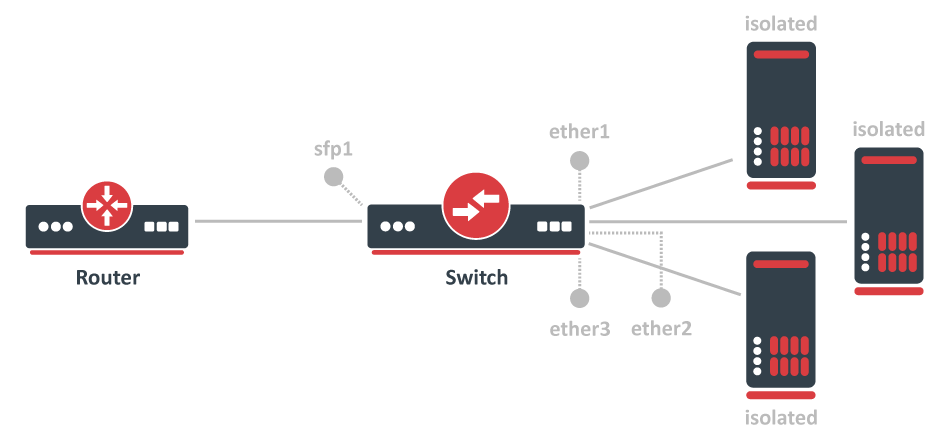
要配置交换机端口隔离,需要交换所有需要的端口。
/interface bridge
add name=bridge1
/interface bridge port
add interface=sfp1 bridge=bridge1 hw=yes
add interface=ether1 bridge=bridge1 hw=yes
add interface=ether2 bridge=bridge1 hw=yes
add interface=ether3 bridge=bridge1 hw=yes
默认情况下,网桥接口的 protocol-mode 被配置为 rstp。对于某些设备, 这可能会禁用硬件卸载, 因为特定的交换机芯片不支持这一功能。请参阅 网桥硬件卸载 部分,了解支持的功能。
覆盖每个需要隔离的交换机端口的出站端口(不包括上行链路端口)。
/interface ethernet switch port-isolation
set ether1 forwarding-override=sfp1
set ether2 forwarding-override=sfp1
set ether3 forwarding-override=sfp1
可以为交换芯片设置多个上行链路端口,通过指定多个接口并用逗号分隔来实现。
隔离的交换组
在某些情况下,可能需要将一组设备与其他组隔离,可以通过交换机端口隔离功能来实现。当有多个网络但你想使用一个交换机时,这是非常有用的,通过端口隔离,可以允许某些交换机端口只能通过一组交换机端口进行通信。在这个例子中,ether1-3 的设备只能与 ether1-3 的设备通信,而 ether4-5 的设备只能与 ether4-5 的设备通信(ether1-3 不能与 ether4-5 通信)。
端口隔离只在同一交换机成员端口之间可用。
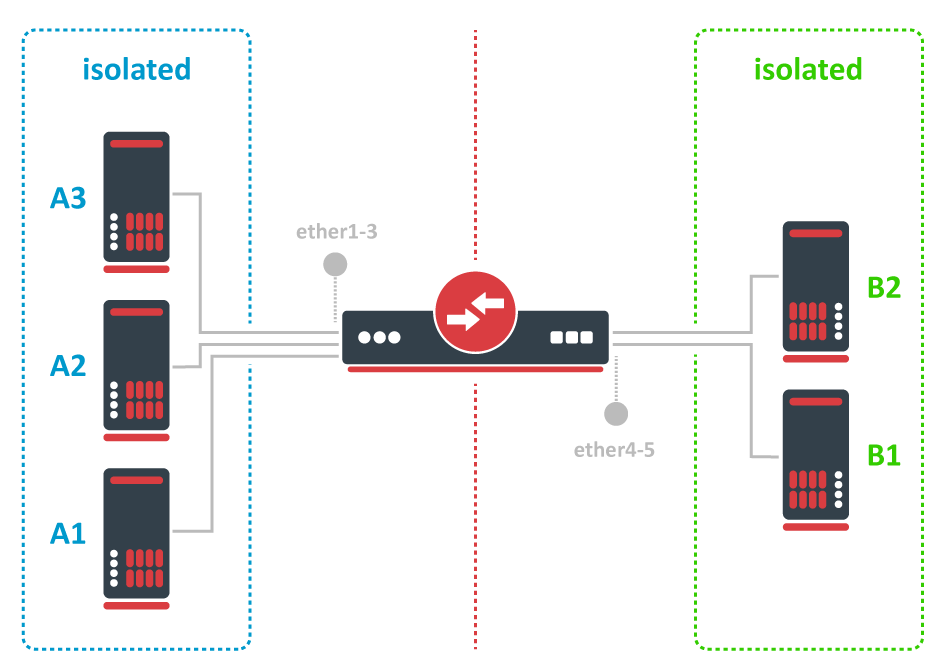
要配置隔离的交换机组,必须先交换所有端口。
/interface bridge
add name=bridge
/interface bridge port
add bridge=bridge1 interface=ether1 hw=yes
add bridge=bridge1 interface=ether2 hw=yes
add bridge=bridge1 interface=ether3 hw=yes
add bridge=bridge1 interface=ether4 hw=yes
add bridge=bridge1 interface=ether5 hw=yes
默认情况下,网桥接口的 "protocol-mode" 被配置为 "rstp"。对于某些设备, 这可能会禁用硬件卸载, 因为有些交换芯片不支持这一功能。请参阅 网桥硬件卸载 部分,了解支持的功能。
然后在 "forwarding-override" 属性中指定你想在同一个隔离的交换组中的所有端口(除了你应用属性的端口),例如,为 A 设备创建一个隔离的交换组。
/interface ethernet switch port-isolation
set ether1 forwarding-override=ether2,ether3
set ether2 forwarding-override=ether1,ether3
set ether3 forwarding-override=ether1,ether2
要为 B 设备创建一个隔离的交换组。
/interface ethernet switch port-isolation
set ether4 forwarding-override=ether5
set ether5 forwarding-override=ether4
CPU流量控制
所有的交换芯片都有一个特殊的端口,这个端口被称为 switchX-cpu,这是交换芯片的CPU端口,它的作用是将流量从交换芯片转发到CPU,管理流量和路由功能需要这样的端口。默认情况下,交换芯片确保这个特殊的CPU端口不被拥堵,并在超过链路容量时发出暂停帧,以确保端口不会过度饱和,这个功能被称为 CPU流量控制。如果没有这个功能,对于路由或管理目的至关重要的数据包可能会被丢弃。
从RouterOS v6.43开始,在一些使用以下交换芯片的设备上可以禁用CPU流量控制功能。Atheros8227、QCA8337、Atheros8327、Atheros7240或Atheros8316。其他交换芯片默认启用该功能,不能改变。要禁用CPU流量控制,请使用以下命令。
/interface ethernet switch set switch1 cpu-flow-control=no
统计数据
一些交换芯片能够报告统计数据,这对于监测有多少数据包从内置的交换芯片被发送到CPU是很有用的。这些统计数据也可以用来监测CPU的流量。下面是一个交换芯片统计数据的例子。
[admin@MikroTik] > /interface ethernet switch print stats

                      name:      switch1
            driver-rx-byte:  221 369 701
          driver-rx-packet:    1 802 975
            driver-tx-byte:   42 621 969
          driver-tx-packet:      310 485
                  rx-bytes:  414 588 529
                 rx-packet:    2 851 236
              rx-too-short:            0
               rx-too-long:            0
              rx-broadcast:    1 040 309
                  rx-pause:            0
              rx-multicast:      486 321
              rx-fcs-error:            0
            rx-align-error:            0
               rx-fragment:            0
                rx-control:            0
             rx-unknown-op:            0
           rx-length-error:            0
             rx-code-error:            0
          rx-carrier-error:            0
                 rx-jabber:            0
                   rx-drop:            0
                  tx-bytes:   44 071 621
                 tx-packet:      312 597
              tx-too-short:            0
               tx-too-long:        8 397
              tx-broadcast:        2 518
                  tx-pause:        2 112
              tx-multicast:        7 142
    tx-excessive-collision:            0
     tx-multiple-collision:            0
       tx-single-collision:            0
     tx-excessive-deferred:            0
               tx-deferred:            0
         tx-late-collision:            0
        tx-total-collision:            0
                   tx-drop:            0
                 tx-jabber:            0
              tx-fcs-error:            0
                tx-control:        2 112
               tx-fragment:            0
                  tx-rx-64:        6 646
              tx-rx-65-127:    1 509 891
             tx-rx-128-255:    1 458 299
             tx-rx-256-511:      178 975
            tx-rx-512-1023:          953
           tx-rx-1024-1518:          672
            tx-rx-1519-max:            0
有些器件有多个CPU核,它们使用独立的数据通道直接连接到内置的交换芯片。这些器件会报告哪个数据通道被用来从交换芯片转发数据包或从CPU端口转发数据包。对于这样的器件,每一行都会增加一个额外行,第一行代表使用第一条数据通道发送的数据,第二行代表使用第二条数据通道发送的数据,以此类推。交换芯片统计的例子,表明器件有多个数据通道连接CPU和内置的交换芯片。
[admin@MikroTik] > /interface ethernet switch print stats
                  name:      switch1
        driver-rx-byte:  226 411 248
                                   0
      driver-rx-packet:    1 854 971
                                   0
        driver-tx-byte:   45 988 067
                                   0
      driver-tx-packet:      345 282
                                   0
              rx-bytes:  233 636 763
                                   0
             rx-packet:    1 855 018
                                   0
          rx-too-short:            0
                                   0
           rx-too-long:            0
                                   0
              rx-pause:            0
                                   0
          rx-fcs-error:            0
                                   0
           rx-overflow:            0
                                   0
              tx-bytes:   47 433 203
                                   0
             tx-packet:      345 282
                                   0
    tx-total-collision:            0
                                   0
设置实例
当使用安全的 vlan-mode 时,请确保你已经将所有需要的接口添加到VLAN表中。为了使路由功能在同一设备上通过使用安全 vlan-mode 的端口正常工作,需要允许从这些端口访问CPU,这可以通过将switchX-cpu接口本身添加到VLAN表中来实现。例子可以在 管理口 部分找到。
可以同时使用内置的交换芯片和CPU来创建一个交换机-路由器设置,即一个设备同时作为一个交换机和一个路由器。你可以在 Switch-Router 指南中找到配置例子。
当允许访问CPU时,是允许从某个端口访问实际的路由器/交换机,这并不总是恰当的。当允许从某个VLAN ID和端口访问CPU时,请确保有适当的防火墙过滤规则保护你的设备,使用防火墙过滤规则,只允许访问某些服务。
带有 MT7621、RTL8367、88E6393X、88E6191X 交换芯片的设备在RouterOS v7中支持 HW offloaded vlan-filtering。"/interface ethernet switch" 菜单上的VLAN相关配置不可用。
VLAN 示例 1 (聚合和访问端口)
带有Atheros交换芯片的RouterBOARD可用于802.1Q Trunking。RouterOS v6中的这一功能由 QCA8337、Atheros8316、Atheros8327、Atheros8227 和 Atheros7240 交换芯片支持。在这个例子中,ether3、ether4 和 ether5 接口是接入端口,而 ether2 是一个聚合端口。接入端口的VLAN ID:ether3 - 400,ether4 - 300,ether5 - 200。
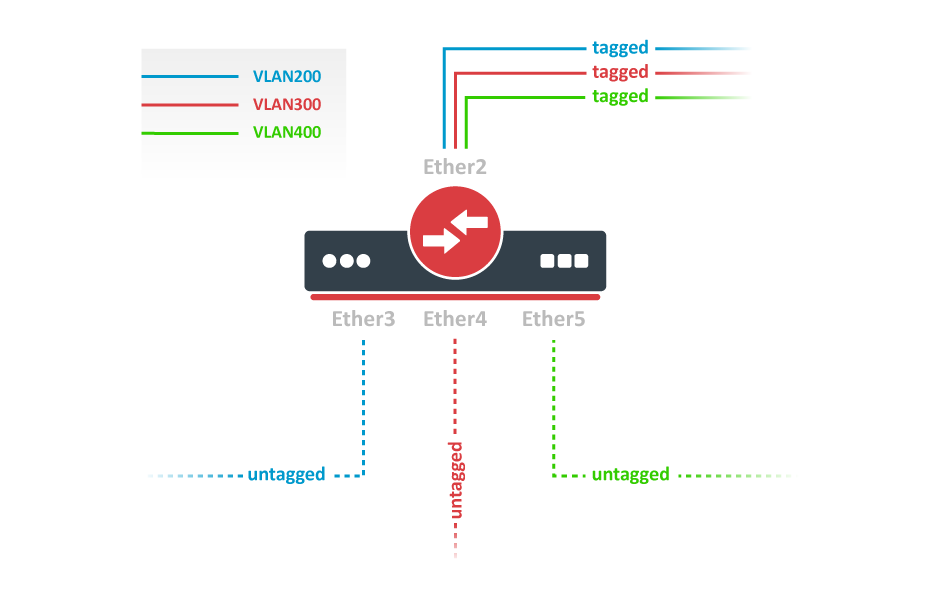
将所需的端口交换到一起。
/interface bridge
add name=bridge1
/interface bridge port
add bridge=bridge1 interface=ether2 hw=yes
add bridge=bridge1 interface=ether3 hw=yes
add bridge=bridge1 interface=ether4 hw=yes
add bridge=bridge1 interface=ether5 hw=yes
默认情况下,网桥接口的 "protocol-mode"被配置为 "rstp"。对于某些设备, 可能会禁用硬件卸载, 因为有些交换芯片不支持这一功能。请参阅 网桥硬件卸载 部分,了解支持的功能。
添加VLAN表项,允许端口之间有特定VLAN ID的帧。
/interface ethernet switch vlan
add ports=ether2,ether3 switch=switch1 vlan-id=200
add ports=ether2,ether4 switch=switch1 vlan-id=300
add ports=ether2,ether5 switch=switch1 vlan-id=400
为每个端口分配 "vlan-mode "和 "vlan-header "模式,并在每个接入端口的入站处分配 "default-vlan-id"。
/interface ethernet switch port
set ether2 vlan-mode=secure vlan-header=add-if-missing
set ether3 vlan-mode=secure vlan-header=always-strip default-vlan-id=200
set ether4 vlan-mode=secure vlan-header=always-strip default-vlan-id=300
set ether5 vlan-mode=secure vlan-header=always-strip default-vlan-id=400
设置
vlan-mode=secure可以确保严格使用VLAN表。为接入端口设置
vlan-header=always-strip,当帧离开交换芯片时,从帧中删除VLAN头。为聚合端口设置
vlan-header=add-if-missing,将VLAN头添加到未标记的帧中。default-vlan-id指定访问端口的无标记入站流量添加什么VLAN ID。
在 QCA8337 和 Atheros8327 交换芯片上,应该使用默认的 vlan-header=leave-as-is 属性。交换芯片将通过使用 default-vlan-id 属性来确定哪些端口是接入端口。default-vlan-id 只应在接入/混合端口上使用,以指定未标记的入站流量被分配到哪个VLAN。
VLAN 示例 2 (聚合和混合端口)
VLAN混合端口,可以同时转发有标签和无标签的流量。这种配置仅由一些千兆交换机芯片(QCA8337,Atheros8327)支持。
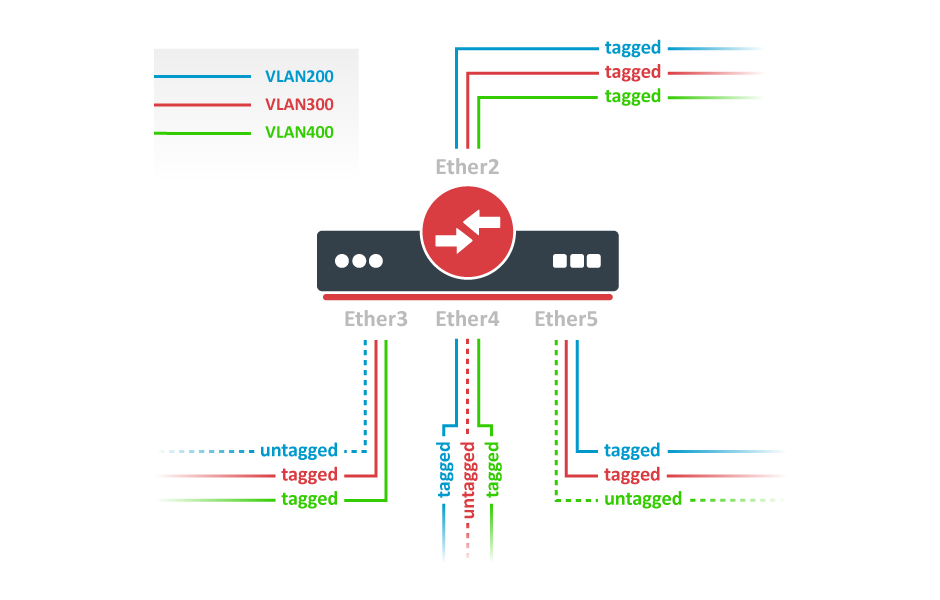
将所需的端口交换到一起。
/interface bridge
add name=bridge1
/interface bridge port
add bridge=bridge1 interface=ether2 hw=yes
add bridge=bridge1 interface=ether3 hw=yes
add bridge=bridge1 interface=ether4 hw=yes
add bridge=bridge1 interface=ether5 hw=yes
默认情况下,网桥接口的 "protocol-mode "被配置为 "rstp"。对于某些设备, 这可能会禁用硬件卸载, 因为有些交换芯片不支持这一功能。请参阅 网桥硬件卸载 部分,了解支持的功能。
添加VLAN表项,允许端口之间有特定VLAN ID的帧。
/interface ethernet switch vlan
add ports=ether2,ether3,ether4,ether5 switch=switch1 vlan-id=200
add ports=ether2,ether3,ether4,ether5 switch=switch1 vlan-id=300
add ports=ether2,ether3,ether4,ether5 switch=switch1 vlan-id=400
在交换机端口菜单中,在所有端口上设置 vlan-mode,在计划的混合端口上设置 default-vlan-id。
/interface ethernet switch port
set ether2 vlan-mode=secure vlan-header=leave-as-is
set ether3 vlan-mode=secure vlan-header=leave-as-is default-vlan-id=200
set ether4 vlan-mode=secure vlan-header=leave-as-is default-vlan-id=300
set ether5 vlan-mode=secure vlan-header=leave-as-is default-vlan-id=400
vlan-mode=secure将确保严格使用VLAN表。default-vlan-id将定义端口上无标记入站流量的VLAN。在QCA8337和Atheros8327芯片中,当使用
vlan-mode=secure时,它忽略了交换机端口的vlan-header选项。VLAN表项处理所有的出站标记/未标记,并在所有端口上作为vlan-header=leave-as-is工作。这意味着进来时有标签,出去时也有标签,只有 "default-vlan-id "帧在出站端口是无标签的。
管理访问配置
这里将显示多个场景的例子,但每个场景都要求有交换的端口。下面你可以找到如何交换多个端口。
/interface bridge
add name=bridge1
/interface bridge port
add interface=ether1 bridge=bridge1 hw=yes
add interface=ether2 bridge=bridge1 hw=yes
默认情况下,网桥接口的 "protocol-mode "被配置为 "rstp"。对于某些设备, 这可能会禁用硬件卸载, 因为有些交换芯片不支持这一功能。请参阅 网桥硬件卸载 部分,了解支持的功能。
在这些例子中,假设 ether1 是聚合端口,ether2 是接入端口,配置如下。
/interface ethernet switch port
set ether1 vlan-header=add-if-missing
set ether2 default-vlan-id=100 vlan-header=always-strip
/interface ethernet switch vlan
add ports=ether1,ether2,switch1-cpu switch=switch1 vlan-id=100
标签
为了使设备只能从某个VLAN访问,需要在网桥接口上创建一个新的VLAN接口,并给它分配一个IP地址。
/interface vlan
add name=MGMT vlan-id=99 interface=bridge1
/ip address
add address=192.168.99.1/24 interface=MGMT
指定允许它从哪些接口访问设备。
/interface ethernet switch vlan
add ports=ether1,switch1-cpu switch=switch1 vlan-id=99
在这个VLAN表中只指定聚合端口,不允许通过接入端口用标签流量访问CPU,因为接入端口会用指定的 default-vlan-id 值对所有入站流量进行标记。
当配置VLAN表时,可以启用 vlan-mode=secure 来限制对CPU的访问。
/interface ethernet switch port
set ether1 vlan-header=add-if-missing vlan-mode=secure
set ether2 default-vlan-id=100 vlan-header=always-strip vlan-mode=secure
set switch1-cpu vlan-header=leave-as-is vlan-mode=secure
无标记
为了使设备能够从接入端口访问,创建一个VLAN接口,其VLAN ID与 default-vlan-id 中设置的相同,例如VLAN 100,并为其添加一个IP地址。
/interface vlan
add name=VLAN100 vlan-id=100 interface=bridge1
/ip address
add address=192.168.100.1/24 interface=VLAN100
指定哪些访问(无标记)端口可以访问CPU。
/interface ethernet switch vlan
add ports=ether1,ether2,switch1-cpu switch=switch1 vlan-id=100
最常见的是一个接入(无标记)端口与一个聚合(有标记)端口一起使用。在无标记访问CPU的情况下,你要同时指定访问端口和聚合端口,这样也可以从聚合端口访问CPU。但并非都需要这样,可能要在VLAN过滤的基础上设置防火墙。
当配置了VLAN表后,可以启用 vlan-mode=secure 来限制对CPU的访问。
/interface ethernet switch port
set ether1 vlan-header=add-if-missing vlan-mode=secure
set ether2 default-vlan-id=100 vlan-header=always-strip vlan-mode=secure
set switch1-cpu vlan-header=leave-as-is vlan-mode=secure
要在有**Atheros7240**交换芯片的设备上使用无标记流量设置管理端口,需要为CPU端口设置 vlan-header=add-if-missing。
从有标记的端口进入无标记的
允许从聚合(标记)端口访问设备,并允许未标记的流量。要做到这一点,要在网桥接口上分配一个IP地址。
/ip address
add address=10.0.0.1/24 interface=bridge1
指定哪些端口允许访问CPU。使用 default-vlan-id 中使用的 vlan-id,用于switch-cpu和聚合端口,默认情况下,设置为0或1。
/interface ethernet switch vlan
add ports=ether1,switch1-cpu switch=switch1 vlan-id=1
当配置了VLAN表后,可以启用 vlan-mode=secure 来限制对CPU的访问。
/interface ethernet switch port
set ether1 default-vlan-id=1 vlan-header=add-if-missing vlan-mode=secure
set switch1-cpu default-vlan-id=1 vlan-header=leave-as-is vlan-mode=secure
对于用 Atheros8316 和 Atheros7240 交换芯片的设备,这个配置例子是不用的。对于使用 QCA8337 和 Atheros8327 交换芯片的设备,可以使用任何其他的 default-vlan-id,只要它在交换机cpu和聚合端口上保持不变。对于用 Atheros8227 交换芯片的设备,只能使用 default-vlan-id=0,聚合端口要使用 vlan-header=leave-as-is。
VLAN间的路由
许多MikroTik的设备都有一个内置的交换芯片,如果配置得当,可以用来改善整体吞吐量。带有交换芯片的设备可以同时作为路由器和交换机使用,这样你可以用一台设备而不是多台设备来连接你的网络。
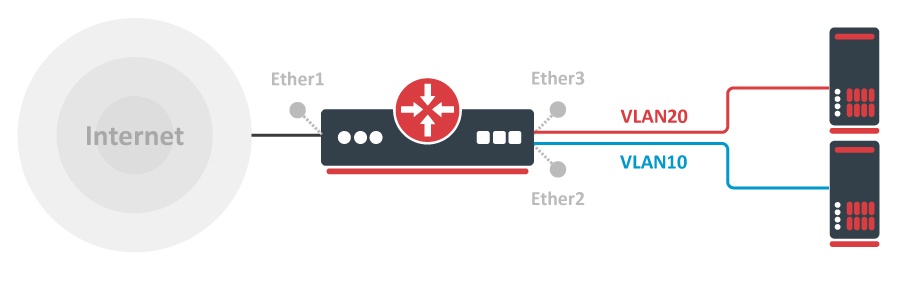
为了让设置发挥作用,必须把所有需要的端口交换到一起
/interface bridge
add name=bridge1
/interface bridge port
add bridge=bridge1 interface=ether2 hw=yes
add bridge=bridge1 interface=ether3 hw=yes
为每个VLAN ID创建一个VLAN接口,并为其分配一个IP地址。
/interface vlan
add interface=bridge1 name=VLAN10 vlan-id=10
add interface=bridge1 name=VLAN20 vlan-id=20
/ip address
add address=192.168.10.1/24 interface=VLAN10
add address=192.168.20.1/24 interface=VLAN20
为每个VLAN设置一个DHCP服务器。
/ip address add address =192.168.88.1/24 interface =ether1 add address =10.0.0.17/24 interface =sfp-sfpplus16 /ip route add gateway =10.0.0.1 /ip firewall filter add action =fasttrack-connection chain =forward connection-state =established,related hw-offload =yes add action =accept chain =forward connection-state =established,related /ip firewall nat add action =masquerade chain =srcnat out-interface-list =WAN
在设备上启用NAT。
/ip firewall nat
add action=masquerade chain=srcnat out-interface=ether1
将每个端口添加到VLAN表中,允许这些端口访问CPU,使DHCP和路由正常工作。
/interface ethernet switch vlan
add independent-learning=yes ports=ether2,switch1-cpu switch=switch1 vlan-id=10
add independent-learning=yes ports=ether3,switch1-cpu switch=switch1 vlan-id=20
指定每个端口为接入端口,在每个端口和switch1-cpu端口上启用安全VLAN模式。
/interface ethernet switch port
set ether2 default-vlan-id=10 vlan-header=always-strip vlan-mode=secure
set ether3 default-vlan-id=20 vlan-header=always-strip vlan-mode=secure
set switch1-cpu vlan-mode=secure
在 QCA8337 和 Atheros8327 交换芯片上,应该使用默认的 vlan-header=leave-as-is 属性。交换芯片将通过使用 default-vlan-id 属性来确定哪些端口是接入端口。default-vlan-id 只应在接入/混合端口上使用以指定未标记的入站流量被分配到哪个VLAN。
如果备有一个交换规则表,那么可以在硬件层面上限制VLAN之间的访问。只要在VLAN接口上添加一个IP地址,就会启用VLAN间的路由,但这可以在硬件层面上进行限制,同时保留DHCP服务器和其他与路由器有关的服务。要实现这一点,请使用这些ACL规则。通过这种配置可以用VLAN实现孤立的端口组。
/interface ethernet switch rule
add dst-address=192.168.20.0/24 new-dst-ports="" ports=ether2 switch=switch1
add dst-address=192.168.10.0/24 new-dst-ports="" ports=ether3 switch=switch1